
Remind someone to sign
Use Remind on an envelope that is out for signature. Each person can be reminded up to five times, and not more than once an hour.
Applies to Technician Admin
A reminder sends the signing link again to the people who have the document now. It does not send to someone whose turn has not started, or to someone who already signed.
Send a reminder#
- Open CRM, then E-Sign, then Envelopes.
- On a row that is out for signature, choose Remind. While it sends, the button reads Sending….
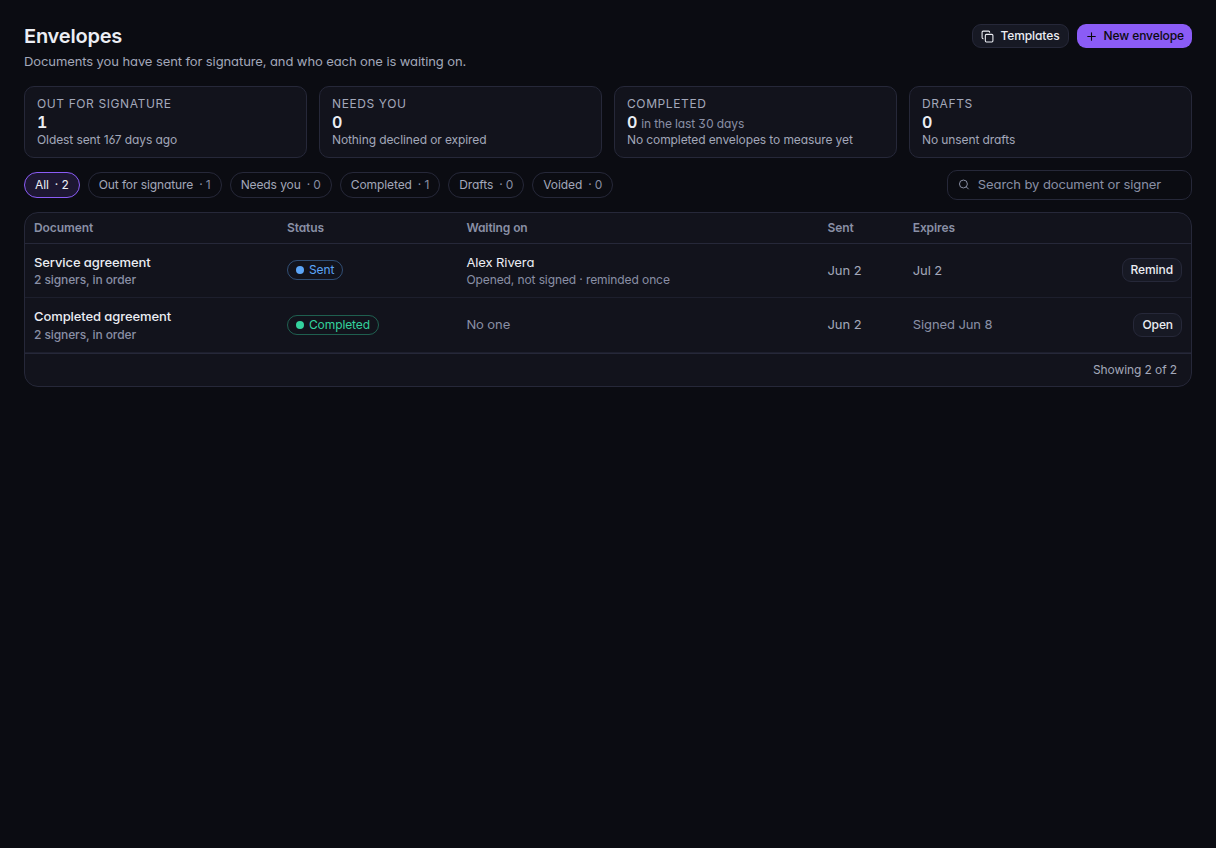
Envelopes, with Remind on the row that is out for signature - Or open the envelope and choose Send reminder. One person shows as Remind and their first name. Several people show as Send reminder.
- Confirm Send a reminder? The dialog says who gets an email with a link. It also shows how many of 5 manual reminders are already used.
- Choose Send reminder.
A success message says the reminder was sent and how many people received it.
If it goes wrong#
- Not reminded: it is not their turn yet. Signing is In order, and someone earlier still has the document. Remind the person who is current.
- No reminder was sent. Everyone waiting was reminded within the last hour, or has had all 5 manual reminders. Wait an hour, or contact the person another way. Five is the limit for manual reminders on that person.
- No reminder was sent. This envelope is no longer out for signature. It was completed, declined, voided, or expired. Open the envelope and read the status.
- The reminder email could not be delivered. Nothing was recorded. The count did not go up. Try again later.
- The reminder could not be sent. Nothing was changed. Retry Send reminder.
What's next#
Was this article helpful?