
Add a task to a project
Add a task on the project board, or from My Tasks with New Task.
Applies to Technician Admin
A task is one piece of work on a project. Add it on that project's board, or from My Tasks when you already know which project it belongs to.
You need permission to change the project. A view-only role does not see Add task or New Task.
Add it on the board#
- Open the project and choose the Board tab.
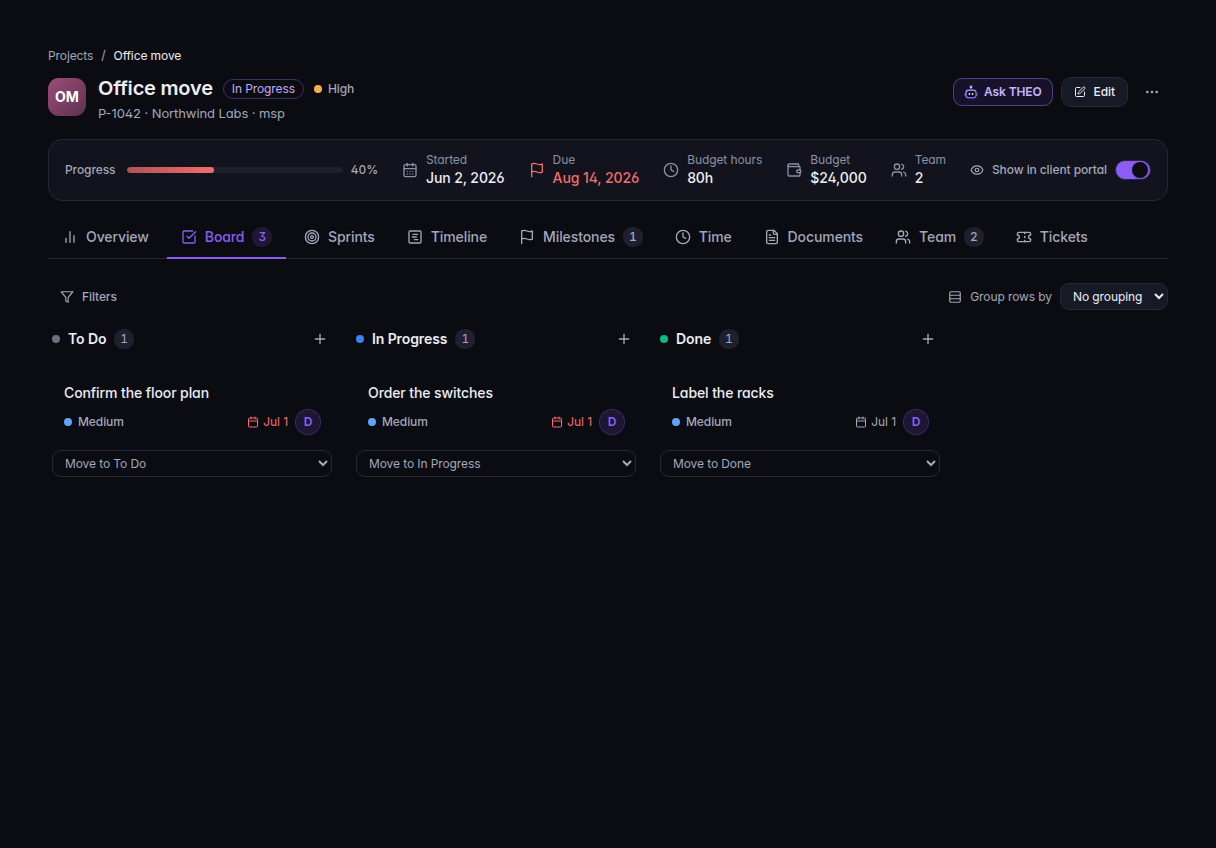
The Board tab, with a task in each column - If the board is empty, choose Add task. The composer says New task in and the column name, usually To Do.
- Type the task name and choose Add. Cancel closes the composer.
On a board that already has tasks, use the add control on the column header for the column you want.
Add it from My Tasks#
- Open PSA, then Projects, then My Tasks.
- Choose New Task.Screenshot coming
The New Task dialog - Choose Project. Enter Task Name. Set Priority and Due Date if you want them.
- Leave Assign to me checked to put the task on yourself, or clear it to leave the task unassigned.
- Choose Create Task.
If it goes wrong#
- Please choose a project. Pick a project in New Task. The task cannot exist on its own.
- Task name is required. Enter a name.
- Failed to create task. The task was not saved. Try again.
- No tasks found on My Tasks. The status filter is hiding them. Check To Do, In Progress, In Review, Blocked, and Done.
- Add task is missing. Your role can view the project and cannot change it.
What's next#
Was this article helpful?