
Follow a project your provider runs
In the portal, open the projects your IT provider runs for you. You can follow progress, comment, and approve items that are waiting.
Applies to Client
These are the projects your IT provider runs for your company. You can follow them. You cannot edit their plan, their board, or their dates.
This is separate from projects your own company creates. See Run projects in your company.
Open one#
- In the portal, open Projects.
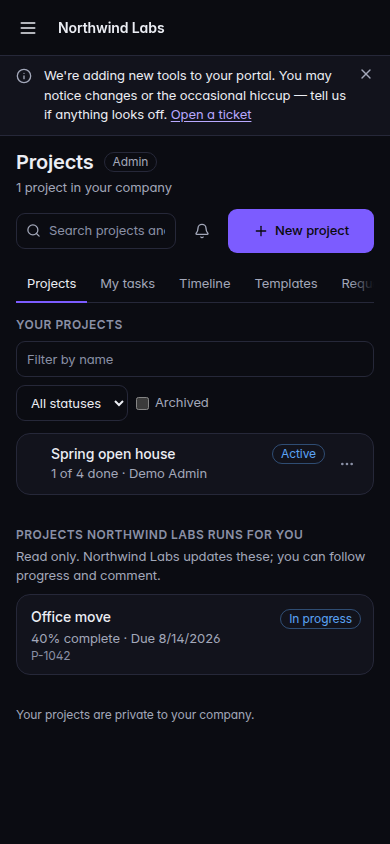
The portal Projects page, with the provider project Office move - Find the heading Projects with your provider's name and runs for you. The line under it says the list is read only.
- Choose View on the project, or the project name.
- Use Overview, Milestones, Tasks, Activity, and Discussion.
On Discussion, write a message and choose Send when you are allowed to comment. Approvals shows when something needs you. Approve and Reject are the decisions.
Empty pages say No milestones defined yet., No tasks to show yet., No activity recorded yet., or No messages yet. Start the conversation with your team below.
If it goes wrong#
- Loading projects from your IT provider… stays on screen, or you see Couldn't load the projects your IT provider runs. Refresh the page. If it stays, tell your provider. They confirm the project is shown to your company.
- Couldn't load this project. Go back to Projects and open it again.
- Approvals couldn't be checked. The rest of the project can still be open. Refresh before you approve or reject.
- Send is missing. Your portal access does not include comments. Ask your provider.
- The project is not in the list. Your provider has not turned on Show in client portal, or it is hidden. Ask them. You cannot turn that on yourself.
What's next#
Was this article helpful?