
Link tickets to a project
The Tickets tab lists PSA tickets tied to this project. Create one from the tab, or link an existing ticket from the ticket.
Applies to Technician Admin
Link a ticket when the service-desk work is part of the project. The project keeps the plan. PSA keeps the ticket. The Tickets tab only reads those tickets. It does not change the project's Progress.
See the linked tickets#
- Open the project.
- Choose Tickets.
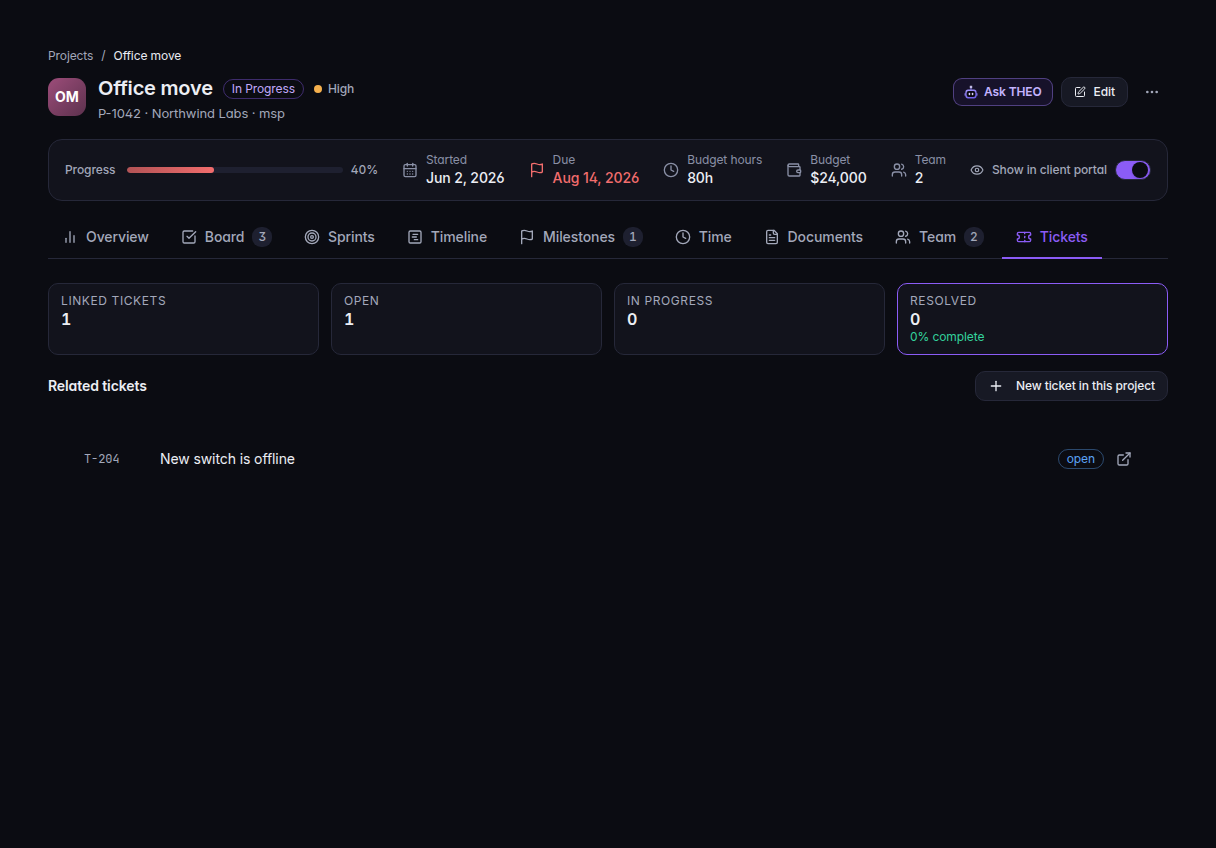
The Tickets tab, with Related tickets and New ticket in this project - Read Related tickets. When tickets are linked, the counts include Linked tickets, Open, In progress, and Resolved.
Add a ticket#
- On Tickets, choose New ticket in this project.
- Finish the ticket the same way you open any ticket. It is created already tied to this project.
To tie a ticket that already exists, open the ticket and set the project on its details. The empty tab says Link a ticket to this project from the ticket's Details rail, or create one here.
Open a row to jump to that ticket in PSA.
If it goes wrong#
- No tickets linked yet. No ticket carries this project. Create one here, or set the project on an existing ticket.
- Couldn't load tickets. PSA did not answer. The link was not removed. Choose the retry on that message. The note says tickets linked to this project will appear here.
What's next#
Was this article helpful?