
Run projects in your company
The portal Projects app is your company's own projects, tasks, timeline, and requests. It is not the plan your IT provider runs.
Applies to Client
Your company's Projects app is a paid upgrade. It is not part of the standard client portal, so most clients do not have it yet. If it is not in your menu, ask your provider about adding it.
The app is for work your company runs. People in your company with access can create projects, add tasks, and use a board. Your IT provider's projects stay in a separate list.
The page says Your projects are private to your company.
Open your projects#
- In the portal, open Projects.
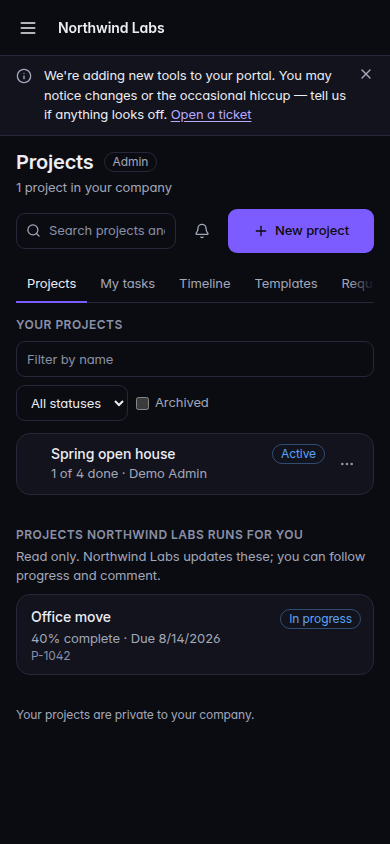
Your projects, with New project and the provider list below - Use the tabs Projects, My tasks, Timeline, Templates, and Requests. A company admin also sees Automations.
- Your role shows as Admin, Can edit, or View only.
View only can look. Can edit and Admin can change projects and tasks. Admin can also show Archived projects.
Add a project#
- Choose New project.
- Under Start from, leave A blank project or pick a template. Due dates on a template are set from the start date.
- Enter Name, Start date, and Due date when you are not using a template.
- Set Owner.
- Choose Create project.
Work the tasks#
- Open the project.
- Switch Board, List, and Calendar.Screenshot coming
A company project on the Board - Choose New task to add work. Add a column is there when you can edit.
- Filter with Search tasks, Anyone, Me, Unassigned, priority, and Open, Done, or All.
The side of the project shows Progress and About, including Status, Owner, Start, and Due.
If it goes wrong#
- Projects is not available to you. Read the reason on the page. It is one of these: Your IT provider has turned Projects off for your company., A company admin has turned Projects off., Your account does not have a seat that includes Projects., or Projects is not available to your account right now. Ask a company admin or your IT provider.
- Your company's own projects are not turned on. You can still see projects your provider runs. Your own list is off.
- Add a name. New project needs a name when you start from a blank project.
- No tasks yet. Add one under To do. The board is empty. Add a task if you can edit.
- View only and the buttons are missing. Ask a company admin to change your access.
What's next#
Was this article helpful?