
Tell your MSP the issue is fixed
For clients. Choose It's resolved for me, then Mark resolved. Your MSP is notified.
Applies to Client
When the problem is gone, tell your MSP from the request. They are notified so they can wrap it up.
The button is It's resolved for me. It only shows while the request is still open.
Confirm it#
- Open Support, then Tickets, and open the request.
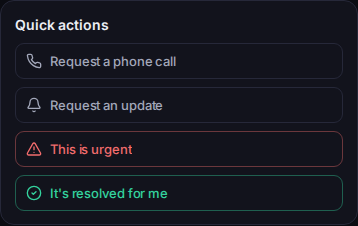
It's resolved for me, under Quick actions - Under Quick actions, choose It's resolved for me.
- Read Mark this request as resolved for you? Your support team will be notified so they can wrap it up.
- Choose Mark resolved.
- You should see Thanks — this request has been marked resolved for you.
If the fix did not hold, you can reopen while the request is resolved and the window is still open. See Reopen your request.
If it goes wrong#
- The button is missing. The request is already resolved or closed.
- We couldn't complete that just now. Nothing has changed on your request — please try again. It was not marked resolved. Try again.
What's next#
Was this article helpful?