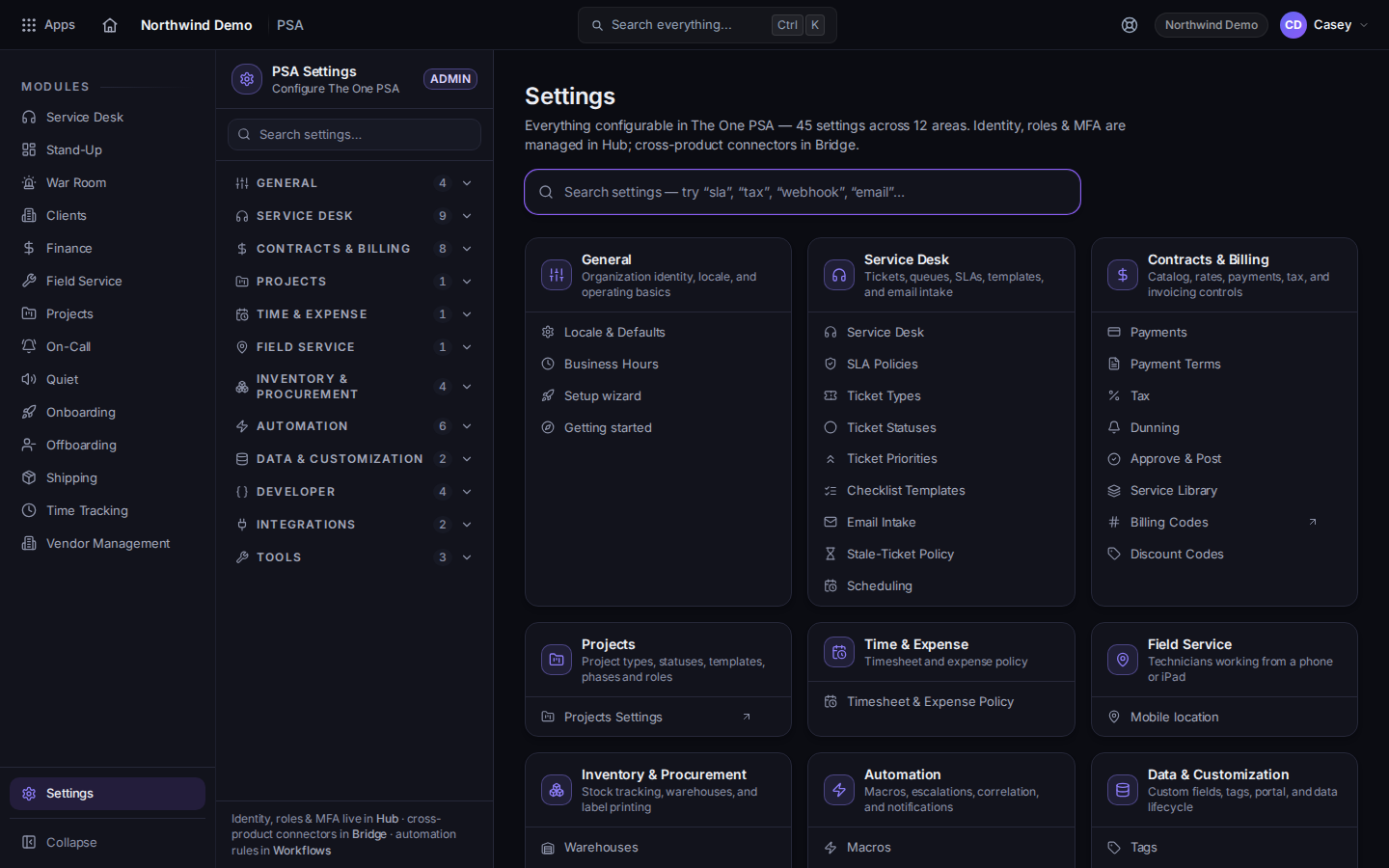
Open PSA settings from the gear. Search finds Service Desk, billing, time, and automation.
1 min read
Applies toAdminOwner
PSA settings are the gear in PSA. The page title is Settings. Search covers the PSA areas. People, roles, and MFA are in the Hub. Connectors are in Bridge.
In PSA, choose the gear. The page title is Settings.PSA Settings, with searchThe search box is labeled Search settings. The home page suggests trying sla, tax, webhook, or email.
Search, or open a group. The groups include General, Service Desk, Contracts & Billing, Time & Expense, Automation, and Integrations.
For tickets, open Service Desk. The items include Service Desk, SLA Policies, Ticket Types, Ticket Statuses, Ticket Priorities, Checklist Templates, Email Intake, Stale-Ticket Policy, and Scheduling.
For surveys after a resolve, use the Service Desk CSAT page, not this list. See Prepare CSAT surveys.
You cannot open the gear. Your role is not an admin. Ask an owner.
A settings item you remember is gone. Ticket templates without a save path, ticket workflow rules, and escalation rules that nothing applied are not in the menu. Recurring tickets are under Service Desk, not under a template item. See Create a recurring ticket.