
Turn email into a ticket
Add an ingest address so mail to that address becomes a ticket.
Applies to Admin
Email intake creates a ticket from mail sent to an address you choose. You set the address in PSA settings, then you forward or publish that address to the people who should use it.
This is an admin setting. Technicians work the tickets that arrive. They do not create the address.
Add the address#
- Open PSA settings from the gear, then Service Desk, then Email Intake. The page title is Email.
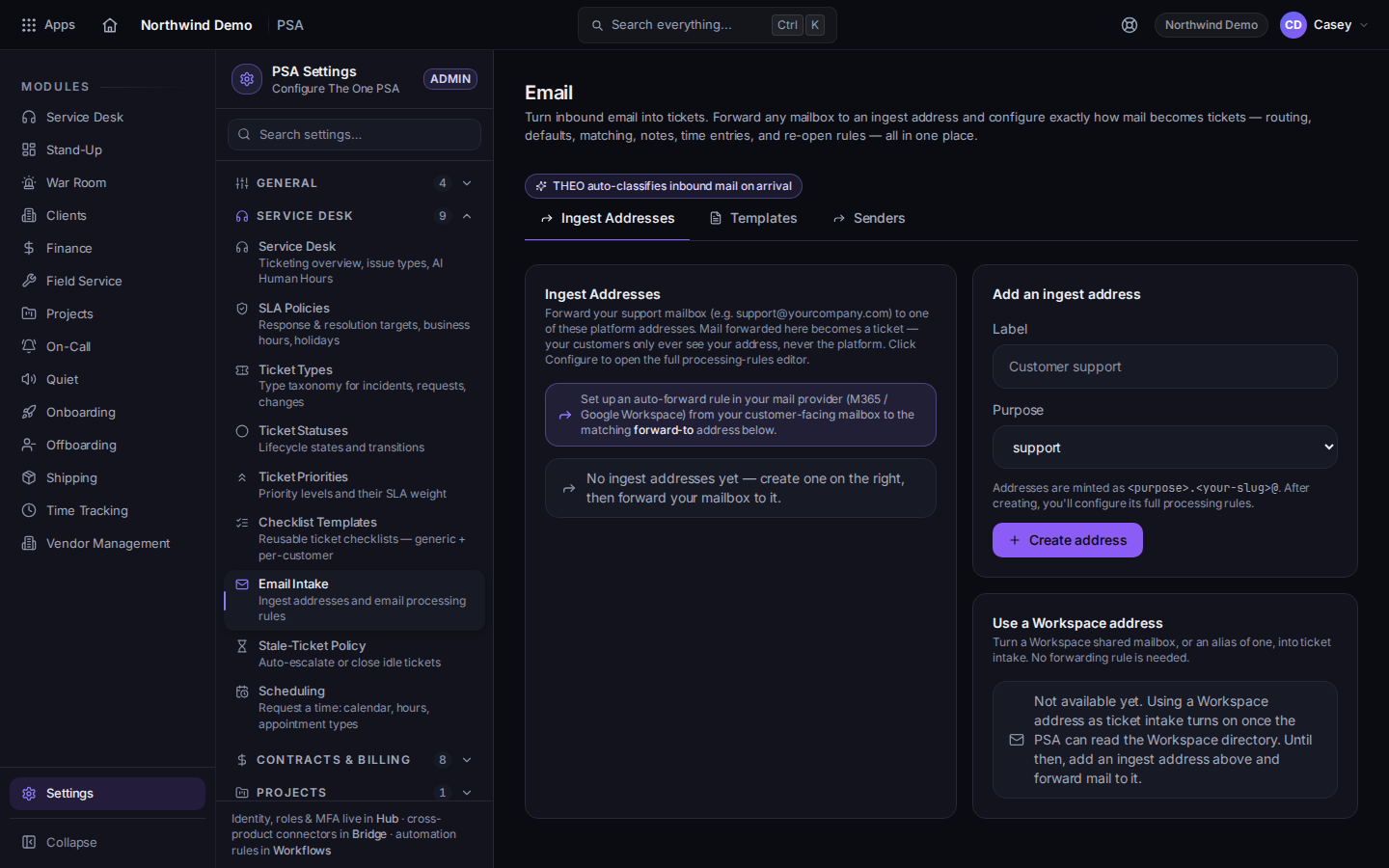
Email Intake, on the Ingest Addresses tab - Open the Ingest Addresses tab.
- Use Add an ingest address and save the address the page gives you.
- Forward the mailbox you want, or give that address to the people who should open tickets by email.
Templates and Senders are the other tabs on the same page. The intake address itself is on Ingest Addresses.
Staff can still open a ticket by hand. See Open a ticket.
If it goes wrong#
- Mail arrives and no ticket appears. Confirm the forward points at the ingest address, and that the address is still on Ingest Addresses.
- You cannot open Email Intake. You are not in PSA settings, or your role cannot open them. Ask an admin.
What's next#
Was this article helpful?