
Open your company CRM
For clients. Open CRM from your apps and read Home.
Applies to Client
CRM is an app in the portal. The tagline on the app is Your contacts, companies and deals in one place.
Open it#
- In the portal, open CRM. On a phone it is in Your apps or Apps.
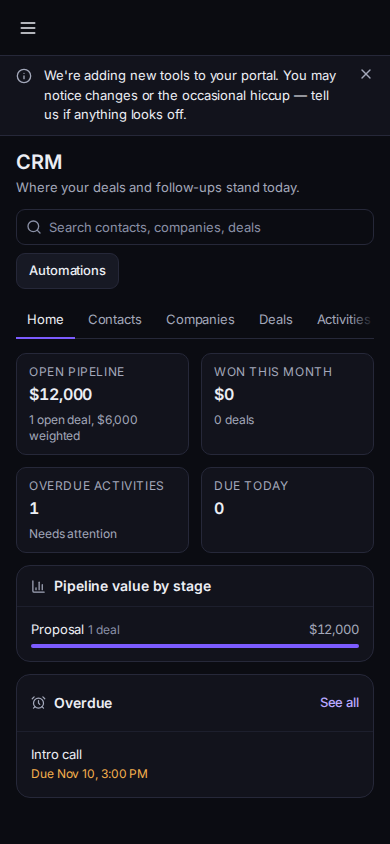
CRM Home in the portal
Phone-width view of sample records.
- You land on Home. The line under the title is Where your deals and follow-ups stand today.
- Read Open pipeline, Won this month, Overdue activities, and Due today. Pipeline value by stage is the chart. Overdue lists late activities. See all opens Activities. Nothing is overdue means that list is clear.
- Use Contacts, Companies, Deals, Activities, or Reports for the list you need.
Loading your CRM... means the page is still reading. Couldn't load your CRM has a retry.
If it goes wrong#
- CRM is not in the menu. Your provider has not turned it on, or it is off for you. See When your CRM will not open.
- Couldn't load the dashboard. Retry. Your lists may still open.
- Set up your CRM is covering the lists. An account admin has to finish setup. See CRM for your company.
What's next#
Was this article helpful?