
See your devices
See the computers your provider monitors. You cannot start remote control.
Applies to Client
Devices is the list of computers your provider monitors or has on record for your company. You can look. You cannot take control of a computer, run a script, or install a patch.
Look at a computer#
- Open Devices.
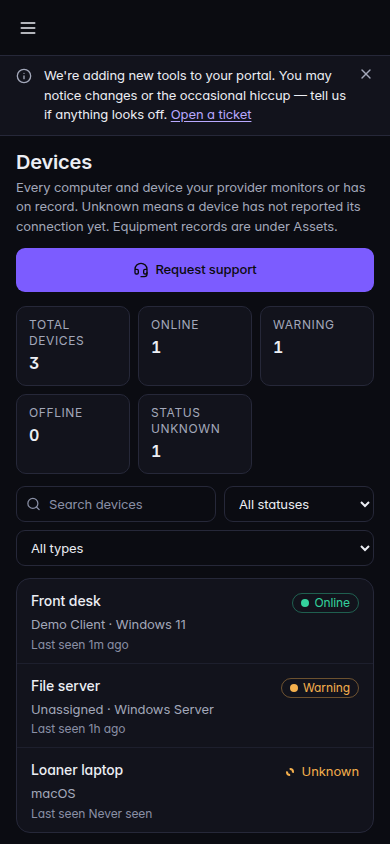
Your devices, with status and Request support
Devices in the client portal. Request support opens a request. It does not start remote control.
- Read the tiles: Total devices, Online, Warning, Offline, and Status unknown. Status unknown means there is no connection signal. It is not the same as Offline.
- Search with Search devices. Filter All statuses or All types if you need a shorter list.
- Open a row for Type, Assigned user, Pending patches, and Operating system. Unassigned means no person is named on that computer.
- Choose Get support or Request support when you need a person. That opens a request. It does not start a remote session. See Get help in the client portal.
Unknown on patches means the patch state was not reported. It does not mean the computer is up to date.
Equipment that is only a record, not a monitored computer, is under Assets.
If it goes wrong#
- No devices yet. Your provider has not enrolled a computer for your company.
- Couldn't load your devices. Retry. The list did not load.
- No matching devices. Clear the search or the filters.
- This device list is incomplete. One of the sources failed. The counts cover only what loaded. Tell your provider if a computer you expect is missing.
- You wanted your vehicles. That is My fleet, not Devices. See See your vehicles.
What's next#
Was this article helpful?