
Set business hours on a number
Choose where a number sends calls during business hours, after hours, and holidays.
Applies to Admin
Each phone number chooses where its calls go during business hours, after hours, and on holidays. Settings does not hold an organization-wide hours form. It points you at Phone Numbers and Holiday Calendars.
The page Settings describes itself as Caller ID and in-app calling for your organization. The section Where calls go repeats the same split.
Set the three slots#
- Open Phone Numbers and choose the number. The row opens Inbound call routing. The heading under the number is What happens when someone calls this number.
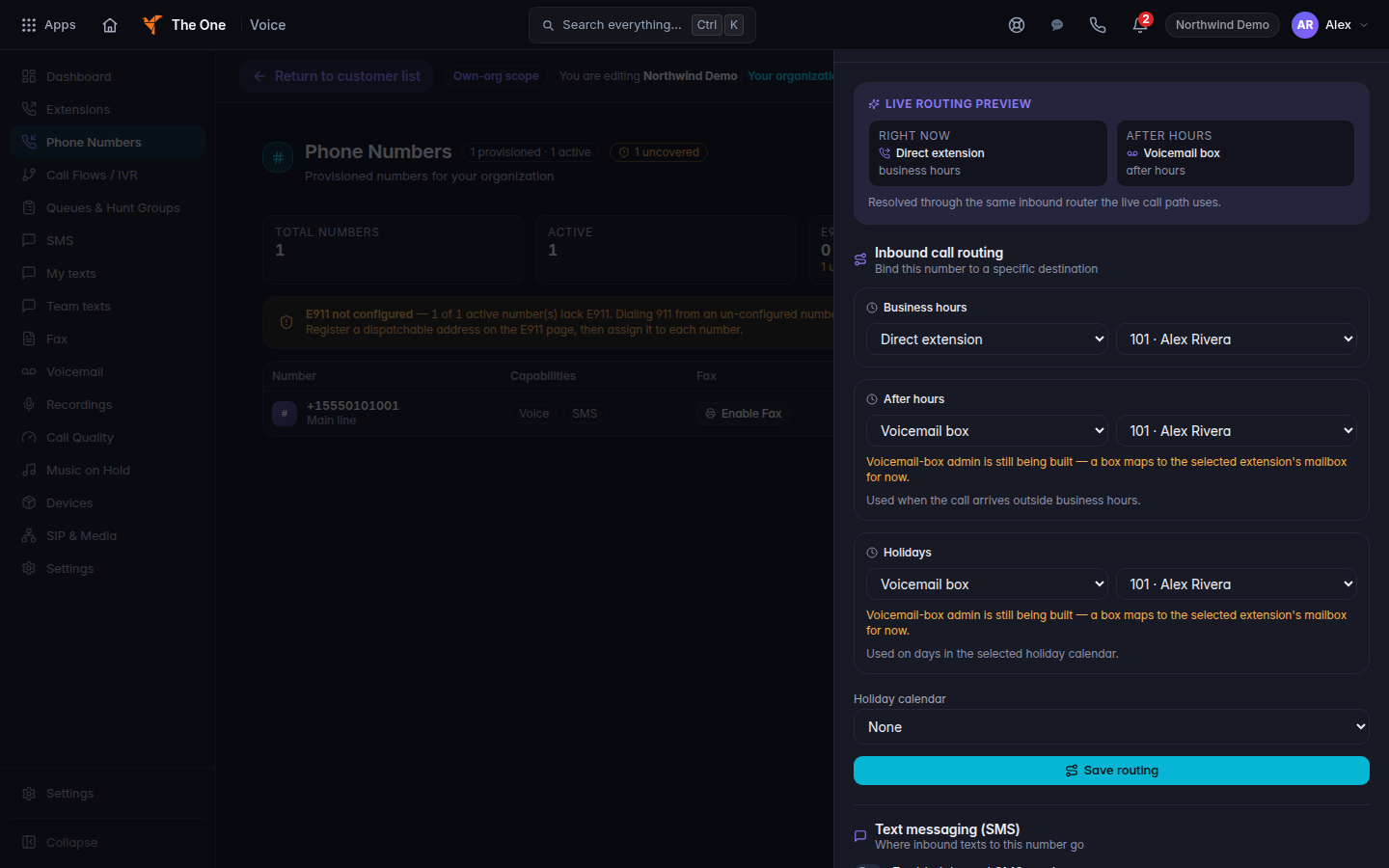
Inbound call routing, with Business hours, After hours, and Holidays - Under Business hours, choose the destination. A ring group is the destination Ring group. A queue, an extension, a call flow, or voicemail are the other kinds the list offers.
- Under After hours, choose the destination. The hint is Used when the call arrives outside business hours.
- Under Holidays, choose the destination. The hint is Used on days in the selected holiday calendar.
- Pick the holiday calendar for this number.
- Choose Save routing. The button reads Saving… while it works.
Live routing preview shows Right now and After hours before you save. It uses the same inbound router a live call uses.
Add a holiday calendar#
- Open Settings and choose Holiday Calendars. You can also open Holiday Calendars from the customer's Voice pages. The title is Holiday Calendars. The description is Define holidays to control call routing and business hours.
- Choose New Calendar. An empty list says No holiday calendars yet.
- Name the calendar, add the days, and save. Then select that calendar on the number.
If it goes wrong#
- Save routing fails. The drawer shows the error. The previous routing is still in place until a save succeeds.
- Holidays never take effect. The number has no calendar selected, or the day is not on that calendar.
- After hours matches business hours. Both slots point at the same destination. That can be what you want. Change After hours if it is not.
What's next#
Was this article helpful?