
Read the audit log
Owners review who changed access, and export the log.
Applies to Owner
Audit Log is the history of identity and access changes, including permission denials. The subtitle is All IAM changes and permission denials with actor, timestamp, and IP. Entries are kept indefinitely. Nothing removes them on a schedule.
Only an owner can open it, and only an owner can export it.
Read the log#
- Open Settings, then Audit Log.
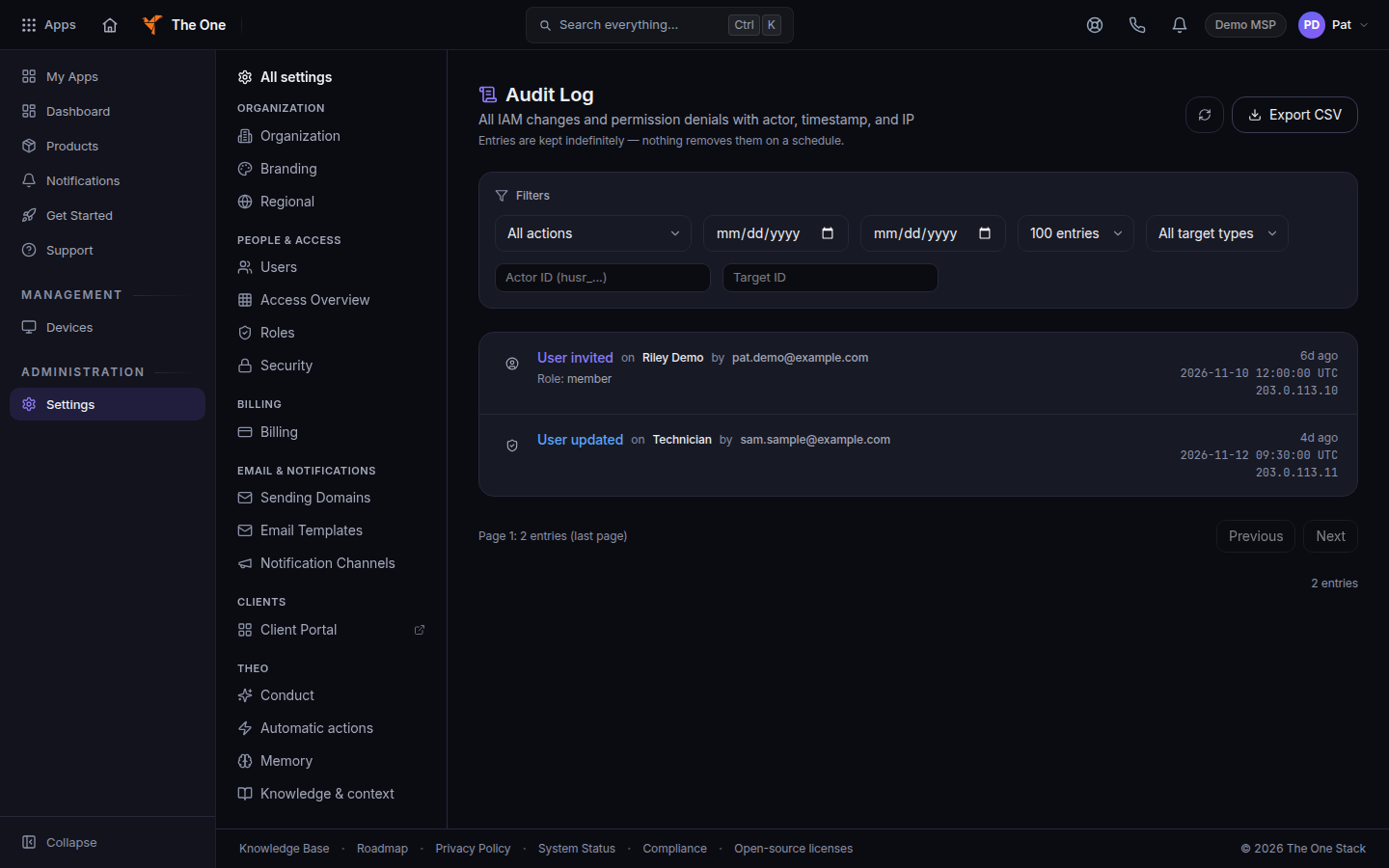
Audit Log, with action and date filters - Filter with All actions, From, To, and All target types. Target types include User, Role, Permission, Product access, and Authentication.
- Narrow further with Actor ID or Target ID when you have those ids.
- Choose a page size: 50, 100, 250, or 500 entries. Use Previous and Next.
- Choose Refresh audit log to reload. Choose Export CSV to download.
If it goes wrong#
- You cannot open Audit Log. The page is owner-only. Admins do not see this row. Ask an owner.
- Only your organization's owner can export the audit log. An admin cannot export. Sign in as an owner.
- No audit entries found. Widen the dates or set the filters back to All actions and All target types.
- A change is missing. The log records identity and permission events. A ticket edit lives on the ticket, not here.
What's next#
Was this article helpful?