
Read role templates
What each template on Roles is for, for staff and for client portal users.
Applies to Owner Admin
A template is a starting set of permissions.
- Open Settings, then Roles. The page title is Roles & Permissions.
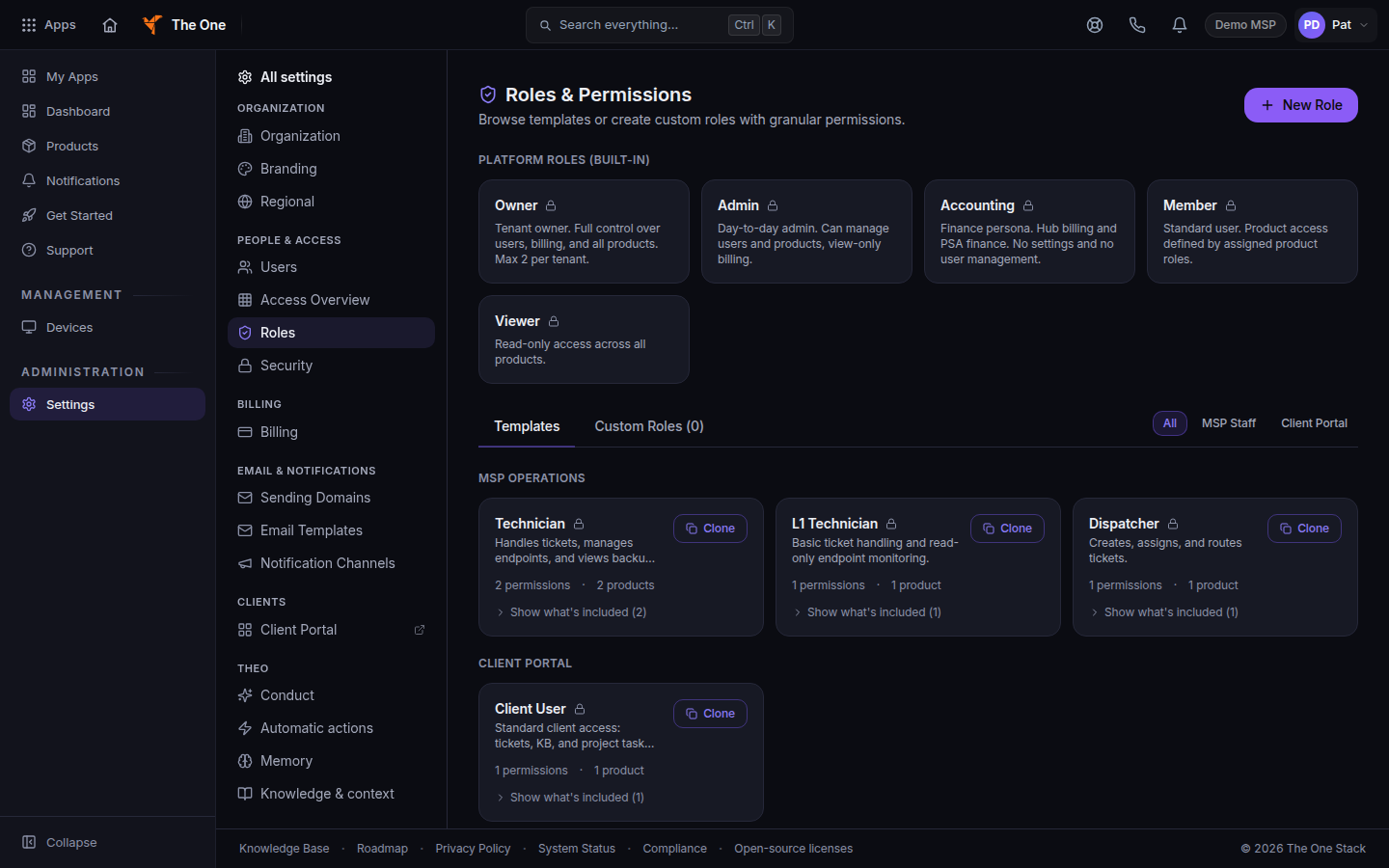
Roles and Permissions on the Templates tab, with All, MSP Staff, and Client Portal - Open Templates. Filter with All, MSP Staff, or Client Portal.
These are permission sets for apps. They are separate from the five platform roles. See Roles and permissions.
An owner can choose Clone on a template, then save it as a custom role. See Create a custom role.
MSP Operations#
| Template | What it is for |
|---|---|
| MSP Owner | Full access to everything across all products and the Hub. |
| MSP Admin | Everything except ownership transfer and destructive billing changes. |
| Service Desk Manager | Manages ticket operations, SLA, escalation, and the knowledge base. |
| Technician | Handles tickets, manages endpoints, and views backup status. |
| L1 Technician | Basic ticket handling and read-only endpoint monitoring. |
| Dispatcher | Creates, assigns, and routes tickets. Read-only endpoint visibility. |
| Project Manager | Full Projects access plus PSA ticket and time visibility. |
| IT Documentation Specialist | Full CMDB access for documentation, passwords, and asset records. |
| Automation Engineer | Full access to Bridge: integrations and automation workflows. |
| Read Only | View-only access across all products, plus opening tickets. No other create, edit, or delete actions. |
Security#
| Template | What it is for |
|---|---|
| Security Analyst | Full SOC, EDR, and endpoint visibility for security monitoring and incident response. |
| GRC Manager | Governance, risk, and compliance management plus security and SOC reporting. |
| Compliance Officer | Full compliance management plus security and legal compliance reporting. |
| SOC Analyst | Full SOC and EDR access for alert monitoring, investigation, and playbook execution. |
Sales and finance#
| Template | What it is for |
|---|---|
| Sales Rep | Full CRM access for deals and contacts, plus PSA quoting and company visibility. |
| Marketing Manager | Campaign management, templates, analytics, and contact visibility. |
| Billing Admin | Full billing control across Hub and PSA. |
Operations#
| Template | What it is for |
|---|---|
| Fleet Manager | Full fleet management including vehicles, maintenance, GPS, and inventory. |
| HR Manager | Views the team roster. There is no People product on this platform any more, so this role carries no employee, PTO, hiring, or performance-review capability. |
Voice#
| Template | What it is for |
|---|---|
| Voice · Viewer | Read-only voice: view extensions, queues, IVR, numbers, E911, recordings, users, billing, and reports. No changes. |
| Voice · Standard | Day-to-day voice: calls, voicemail, fax, and SMS, plus the person's own extension. No org-wide configuration. |
| Voice · MSP Technician / Helpdesk | Manage extensions, queues, IVR, provisioning, and SMS. View numbers, E911, recordings, and users. Cannot buy, port, or release numbers, and cannot change billing or compliance campaigns. |
| Voice · Admin | Full voice management for this MSP's customers, including numbers, E911, recordings, and SMS campaigns. |
| Voice — Customer Admin | A client's front desk admin for their own voice: extensions, queues, IVR, E911, SMS, and users. The MSP can withhold number purchase, billing changes, and recording deletion. |
| Voice — Customer User | A client's own extension, voicemail, devices, calls, and SMS. No org-wide configuration. |
Clarity#
Clarity is not available to open as an app yet. These templates can still appear on the page.
| Template | What it is for |
|---|---|
| Clarity · Viewer | Read-only operational analytics. Excludes financial reports. |
| Clarity · Standard | Operational analytics plus dashboards and reports. Excludes financial reports. |
| Clarity · Admin | Full Clarity access, including financial reports, connectors, export, and administration. |
Client portal#
| Template | What it is for |
|---|---|
| Client Admin | Full client portal access. Portal users are created, edited, and deactivated by the MSP. |
| Client User | Standard client access: tickets and project task collaboration. Knowledge Base is not turned on for clients yet. |
| Client Viewer | Read-only access across all enabled client portal sections. |
| SAT User | Minimal client portal access: submit tickets. |
A card that says Route-guarded role — access is not expressed as permission flags is enforced by the app's own screens. The permission count on that card is not the access list.
If it goes wrong#
- The page says this area is for your organization's owners and admins. You are signed in as a member. Ask an owner or admin.
- No templates loaded. The list has not been filled in. Seed Templates is limited to the platform operator. If you are an organization owner and the action is refused, contact [email protected].
- Ask your organization owner to add role templates. You can read the page. You cannot seed or clone.
What's next#
Was this article helpful?