
Report a phishing email
Report the open email from Hawkeye, and choose whether it also moves to Junk.
Applies to Client Technician
Reporting tells your IT team about the email you have open. Hawkeye does not delete the message. The only mailbox change it can make is moving that one message to your Junk Email folder, and only when you choose that button.
Check the verdict first. See Using Hawkeye in Outlook.
Report it#
- Read the headline on the Hawkeye pane.
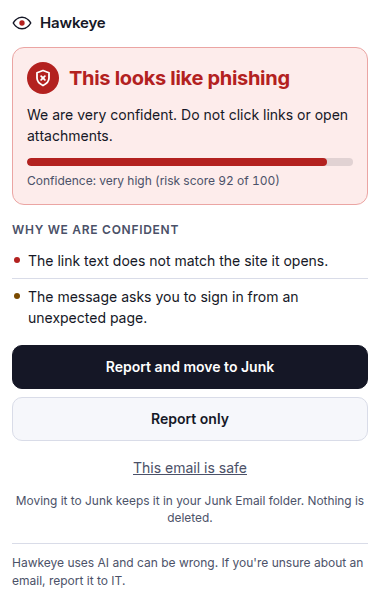
A phishing verdict in Hawkeye, with Report and move to Junk, Report only, and This email is safe - Use the buttons for that verdict.
- This looks like phishing: Report and move to Junk, Report only, or This email is safe. The hint says moving it to Junk keeps it in your Junk Email folder and nothing is deleted.
- Suspicious: worth a second look: Report to IT, or Report and move to Junk.
- Looks safe: Report anyway if something still feels wrong. That report does not move the message.
- This email is safe reports nothing and moves nothing. The pane says OK. Nothing was reported and nothing was moved.
- While a report is sending, the pane says Reporting to your IT team… or Moving to Junk and reporting to your IT team…
You do not get an email back about the report. If you moved a message by mistake, look in Junk Email.
If you already clicked a link or entered a password, tell your IT team and change that password. Do not wait for the report alone.
If it goes wrong#
- Could not report this email. Try again. Choose Try reporting again.
- The move to Junk failed. The report may still have been sent. Read the note on the pane. The message was not deleted.
- Hawkeye couldn't check this message. You can still choose Report to IT when the pane offers it.
What's next#
Was this article helpful?