
Your security training
Open your security training in the portal and finish a lesson.
Applies to Client
Your IT team may enroll you in short security training. Lessons are scenarios you work through in the portal.
You do not assign your own lessons. An administrator does that. See Assign security training if you are that administrator.
Take a lesson#
- Open Security and Training. The page title is Training Dashboard.
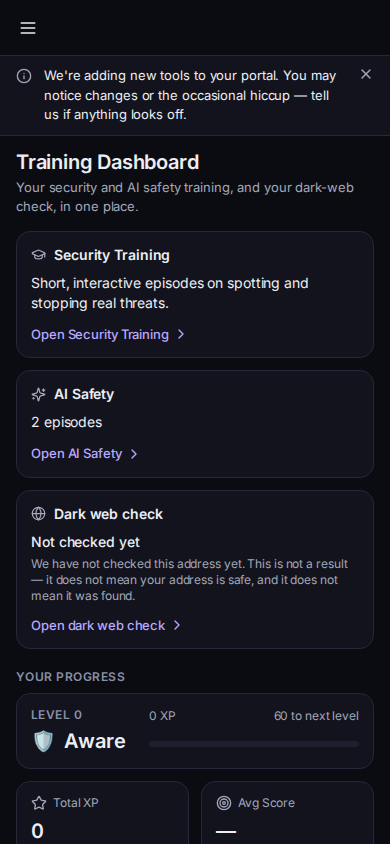
Training Dashboard, with Open Security Training - On the Security Training card, choose Open Security Training. You can also open Security Training in the portal menu.
- Choose Start lesson or Continue for the next lesson. On a lesson that is already started, the button may read Start, Resume, or Replay.
- Work the scenario. At each decision, choose what you would do. The story follows your choice.
- When it ends, read the debrief. It explains the outcome. Points show as the XP you earned, or as XP still syncing if they have not arrived yet.
The dashboard can show your level, points, streak, and achievements when those numbers load. If they cannot be read, the page says your training itself is unaffected. A badge count that cannot be read is shown as a dash, and the page says nothing you have earned has been lost.
The same dashboard can show AI Safety, HIPAA and Dark web check when your organization includes them. See Take AI safety training and Take HIPAA training. Open dark web check is a separate card. This article does not cover that check.
Hawkeye can show Start training when lessons are waiting. See Using Hawkeye in Outlook.
If it goes wrong#
- No training published yet. Your organization has not published episodes. Nothing is overdue. Ask your IT team.
- We couldn't load your training progress just now. Retry. Your lessons are still there if the catalog opens.
- You do not see Security Training. Your organization has not switched it on for you. Ask your IT team.
- A session will not finish. Reload and start again. If it keeps happening, contact support and include the lesson name and what you saw.
What's next#
Was this article helpful?